

Créer un site internet

Matlab logo

Matlab

In Matlab

FB_Matlab

By On 23/06/2021

[x,y] = meshgrid(-1:.1:1, -1:.1:1);

z=(x.^2+y.^2).*cos(x.^2+y.^2);

surf(x,y,z)


In Matlab
Matlab logo

Introduction

By On 28/02/2021

Write the following mathematical expressions in the form of instructions to be executed in Matlab:

  1. Amour et maths, mathématiques romantiques, x=5, y=2.

  2. L'identité d'Euler - le hollandais volant

  3. Les mathématiques décrivent-elles le réel ? | Lelivrescolaire.fr,r=5, n=100, i=2.

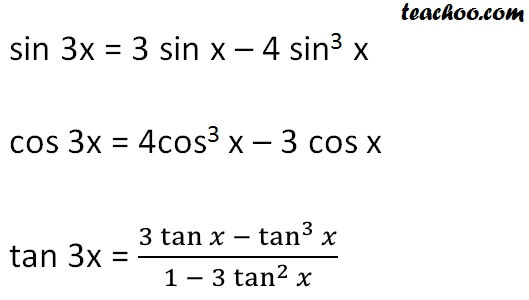
  4. Triple angle formulas - Trigonometry - Teachoo - 2x 3x formula - Provi, x= 0,5
  5. f=Formule polynomiale d'équation numérique des nombres, équation mathématique,  angle, texte png | PNGEgg, x=7, a=b=10,
In Matlab

electrical machine design

By On 30/08/2020

In Matlab

Speech Recognition System

By On 25/04/2020

Speech Recognition System

In Matlab

DC Motor Position: Simulink Modeling

By On 25/04/2020

DC Motor Position: Simulink Modeling Contents

In Matlab

Model of induction machine by simulink description

By On 25/04/2020

Model of induction machine by simulink description

In Matlab

Simplified Fuzzy ARTMAP Neural Network - Implementation of Simplified Fuzzy ARTMAP Neural Network.

By On 25/04/2020

Simplified Fuzzy ARTMAP Neural Network - Implementation of Simplified Fuzzy ARTMAP Neural Network


In Matlab

Peng-Robinson EoS calculates the compressibility factor, fugacity coefficient and density of a pure component.

By On 25/04/2020

 Peng-Robinson EoS calculates the compressibility factor, fugacity coefficient and density of a pure component.

In Matlab

Feedback Control of Dynamic Systems description

By On 25/04/2020

Feedback Control of Dynamic Systems description


In Matlab

Model of induction machine by simulink 

By On 25/04/2020

Model of induction machine by simulink 


In Matlab

Control Tutorials for MATLAB and Simulink (CTMS)

By On 25/04/2020

Navigation: There are several items listed down the left column of the main page. These represent the various steps or approaches in the controller design process: System modeling and analysis - PID, root locus, frequency domain, state-space, and digital controller design - and Simulink modeling and control. Along the top of the main page, you will find an introductory section along with seven interesting and informative examples which illustrate the controller design process. We recommend beginning by reading through all of the introductory sections and then continuing on to the examples. In general the difficululty of the tutorials increases from left to right.

We also envision that you will follow along with these tutorials by running MATLAB/Simulink in one window and the tutorials in another. You should be able to run most of the MATLAB programs by copying and pasting between windows; the Simulink models can be executed by downloading the model files. You may also find the tutorials helpful as an on-line reference while doing homework assignments or for reviewing concepts before exams. If you have no prior experience with MATLAB, the first tutorials at the top, MATLAB and Simulink Basics are recommended.

In Matlab
Images 2

Matlab tutorial, help and example

By On 07/12/2012

Matlab tutorial, help and example